

Inspection work is essential to prevent problems on the job regardless industry. In addition, since inspection work is a periodic process, it is necessary to create a template and implement it without omissions.
On the other hand, there may be many people who are worried that they cannot find a template that suits their company’s inspections, or that they want to add items to an existing template.
In this issue, we will introduce best 4 templates for inspection report and how to create an basic inspection for below people.
- “The inspection items are complicated, so I want to create my own inspection chart simply.”
- “I want to know which templates can be used to easily create an inspection list.”
- “I am looking for a solution to the tedious task of inputting data into Excel every time.”
This article will help you understand how to create and manage a template that fits your company’s needs and improve the efficiency of your inspection work.
Contents
Why do we need an inspection report?
The reason why you need an inspection sheet is “to make inspections more efficient and to keep a record of them”.
For example, an inspection sheet has items to be checked in advance, so that inspections can be carried out without omissions even within a limited time frame. In addition, since a record is kept of “who inspected and when,” it is easy to look back when there is a problem.
As described above, an inspection report is needed to efficiently proceed with inspections and keep records of the results. In addition, more and more companies are using templates in Excel and Google Sheets format for inspection reports or recording them on IT tools such as Stock.
How to create an inspection report in Excel and Google Sheets
Here we explain how to create an inspection report in Excel and Google Sheets, with images. If you are worried that “templates distributed on the Internet are inconvenient,” follow the steps below to create a template that suits your company.
Step 1|Prepare a year/month/day section
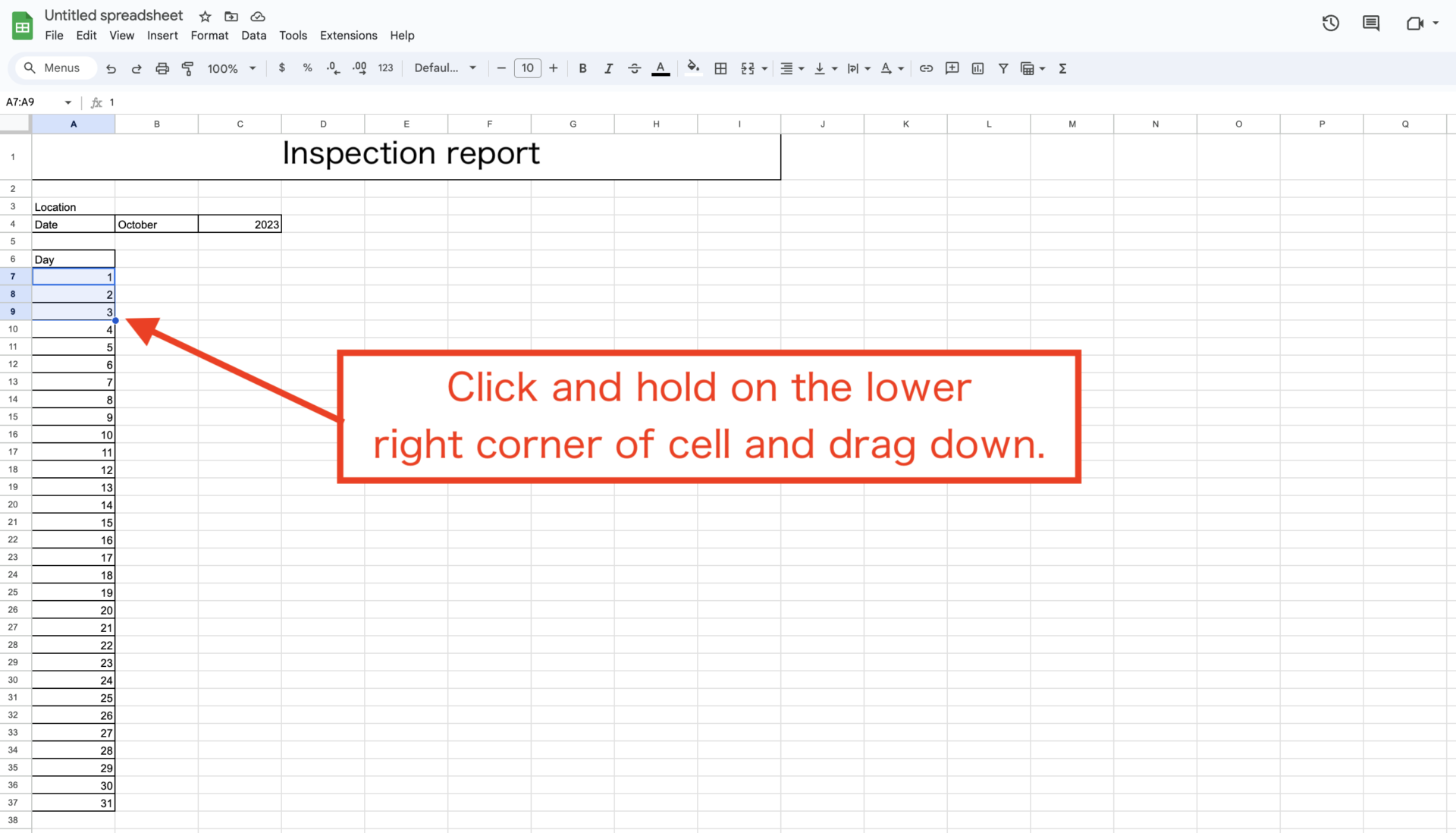
First, open Excel and Google Sheets and fill in the year/month/day fields in the inspection table as shown below. To use functions later, enter the year/month/day in separate cells.

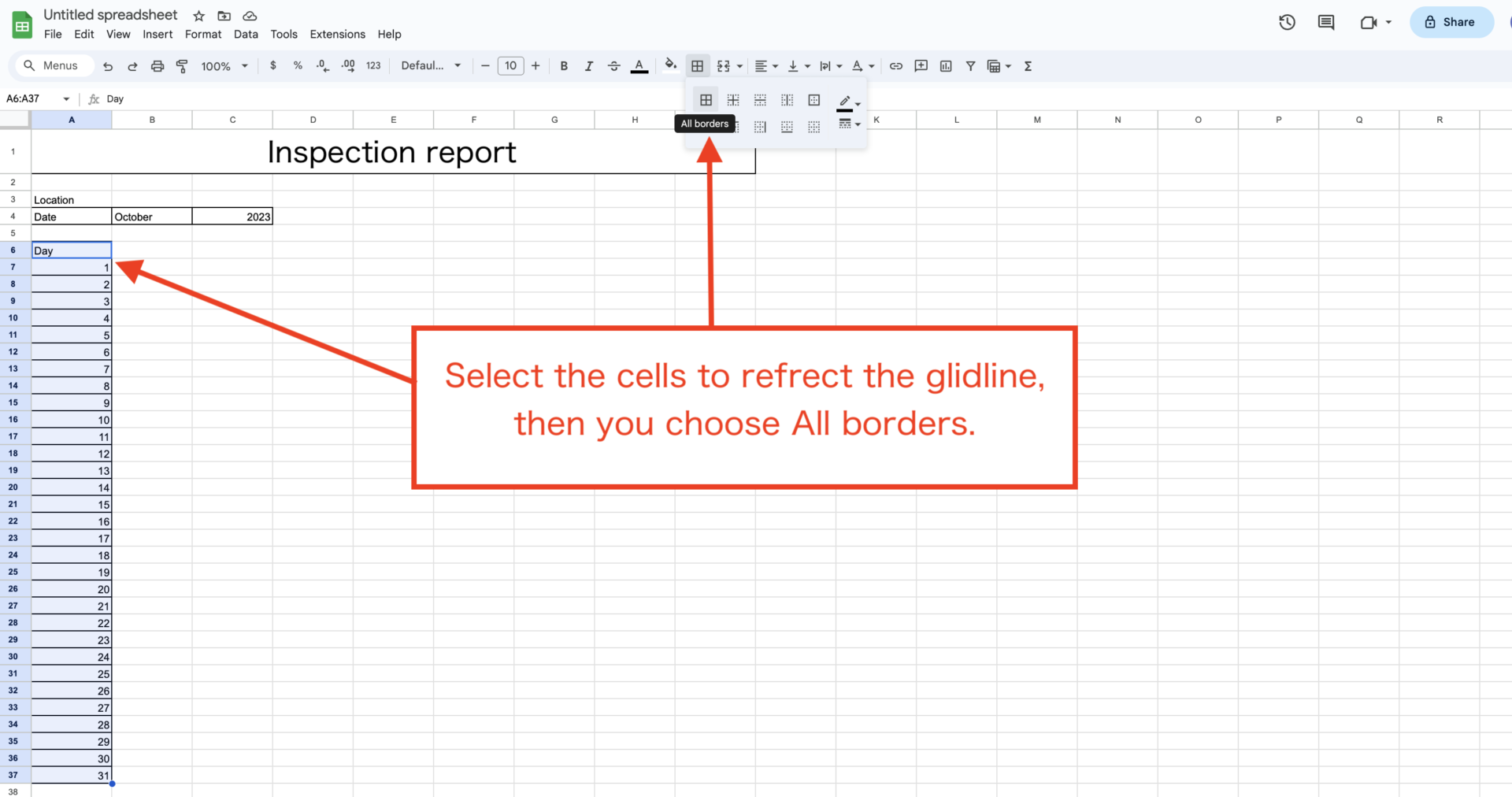
See below for instructions on how to enter the dates consecutively and border the cells.
Step 2|Establish a day of the week entry
Next, add a day of the week entry to the table. It is tedious to enter the days of the week manually, but the function “=TEXT(DATE(year,month,day), “ddd”)” is efficient. In the year, month, and day parts, enter the number of the cell that applies.
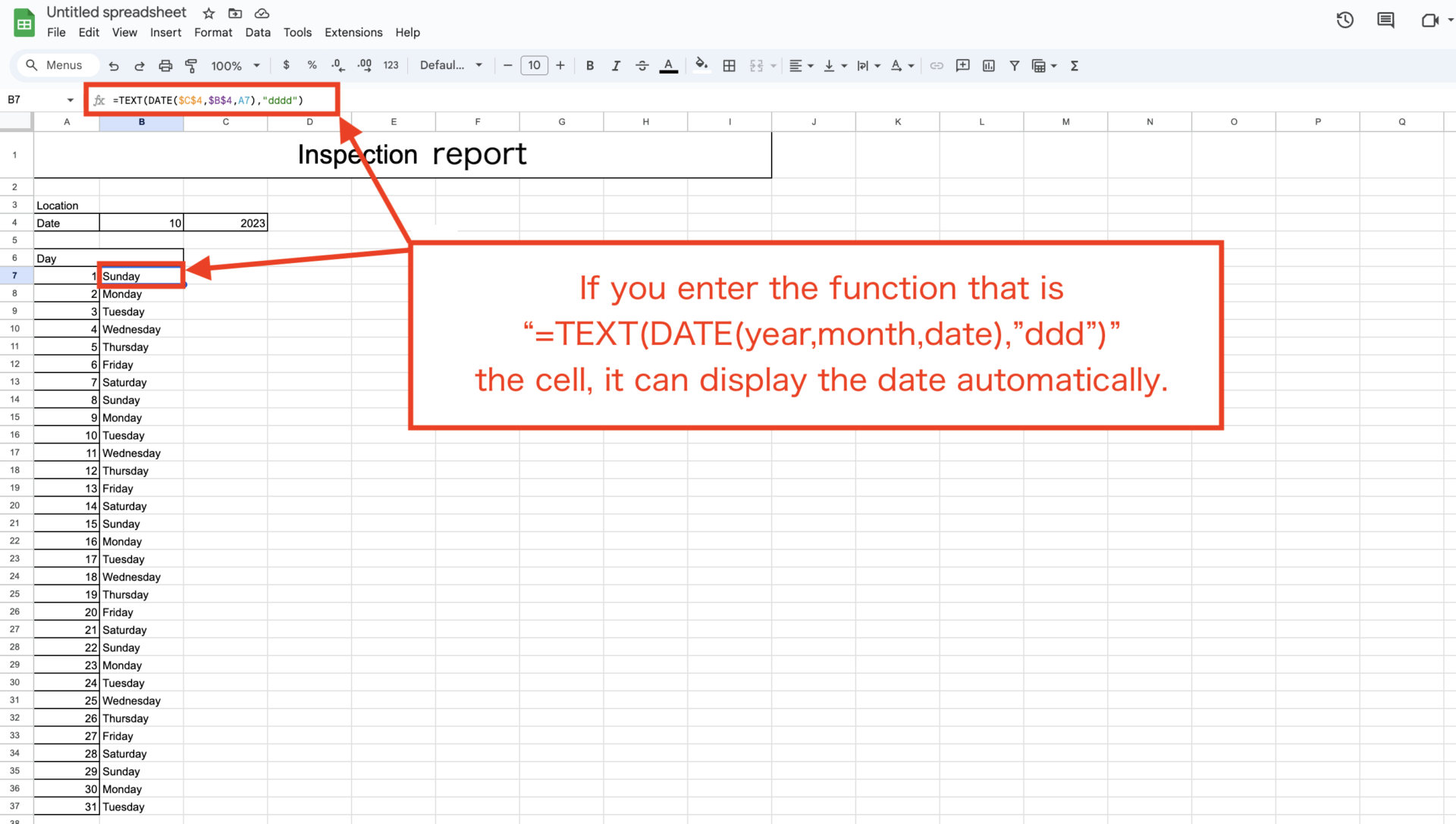
When you have finished entering the days of the week, the image above should look like this.
Step 3|Insert inspection items
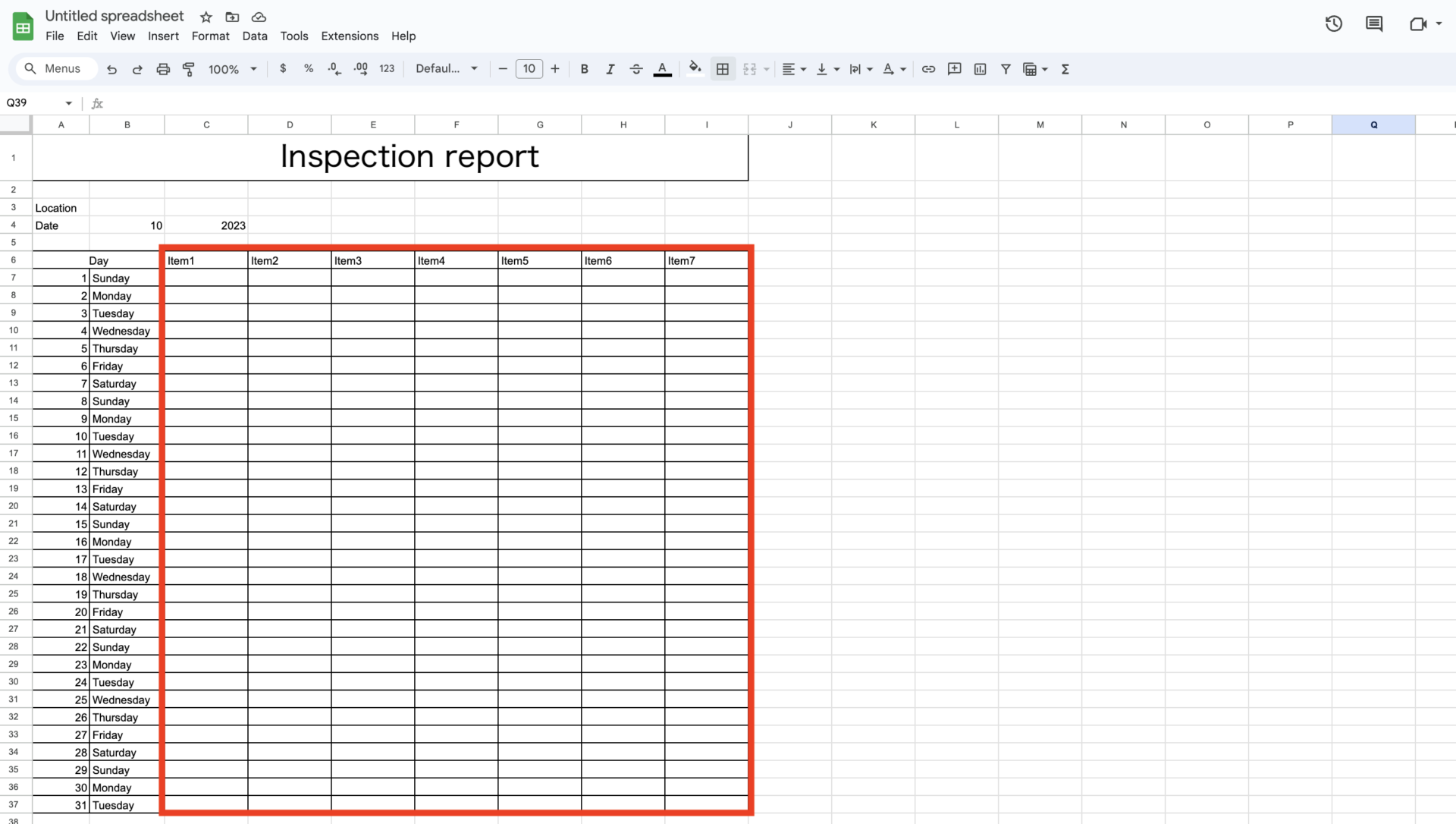
Finally, complete the inspection report by setting up an inspection item column as shown in the image below. You can optionally set up a column for the person in charge, a confirmation seal, etc.
4 templates for inspection report using Excel and Google Sheets
Below are 4 templates for inspection sheets using Excel and Google Sheets. You will not want to miss these templates, which range from simple templates that can be used in a variety of situations to templates tailored to pinpoint needs such as equipment inspections and cleaning inspections.
(1) Inspection report template by Workyard
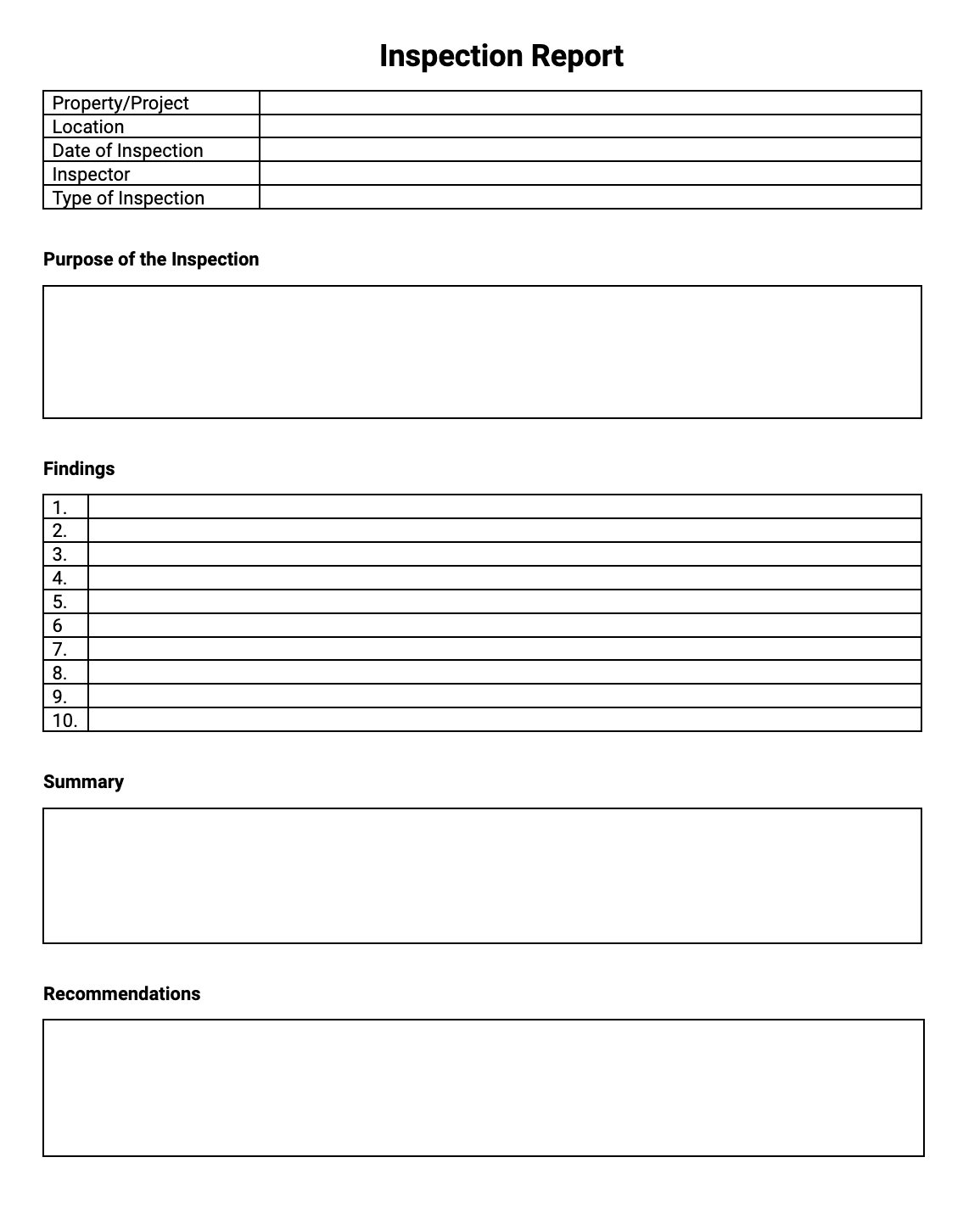
Here is a simple inspection report template that can be used for a variety of purposes provided by Workyard.
Workyard is the tool for labor management for saving waste expenses, and this template is simply designed for any purposes. Also, there is one of the merit that can help you to create the report based on this.
(2) Property inspection report template by Sitemate
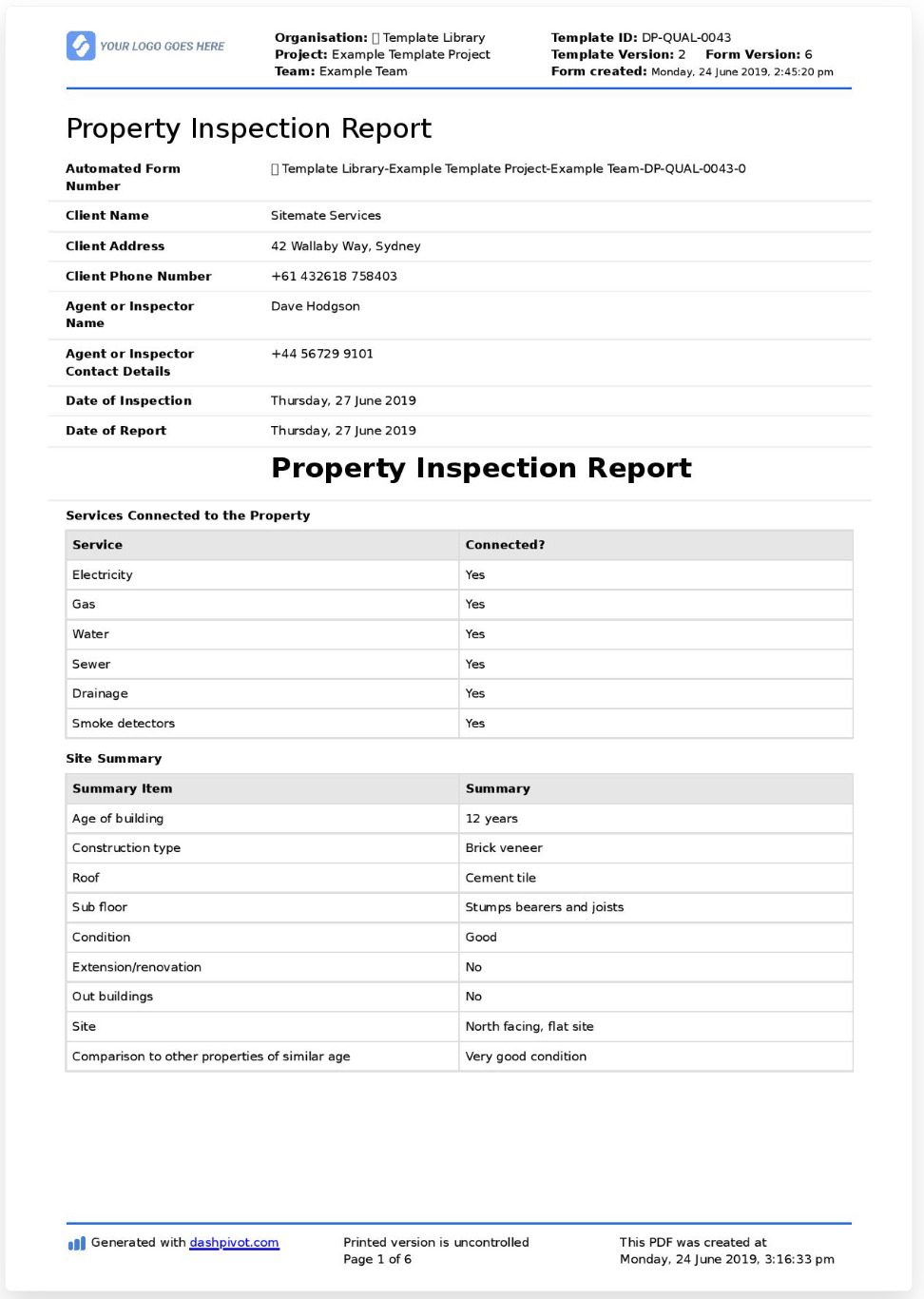
Here is a template for a property inspection sheet provided by Sitemate.
Sitemate is a tool that is for the person who work on site to increase productivity, safety management, and quality management. This template is specialized into property inspection, and almost inspection items can be formatted filled in according to your company’s flow. Also, you can enter the details of any deficiencies found during the inspection and any items of inspection point to chart.
(3) Cleaning inspection report template by Airslate
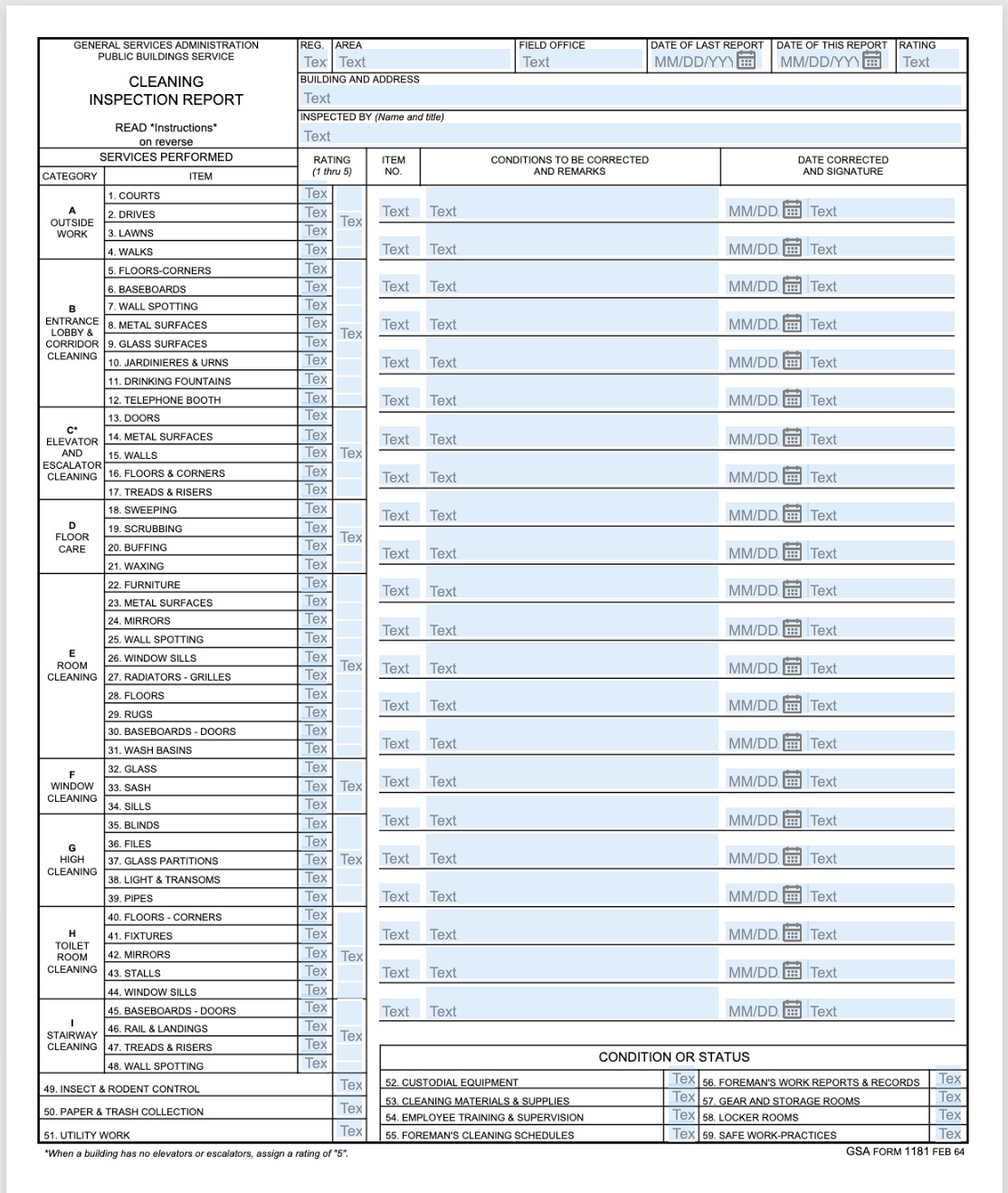
Here is a template for a cleaning inspection sheet provided by Airslate.
As items of this template includes various kinds of inspection point, it helps you to check without omission. If you need to add the items, you can add the new item to in dashboard of Airslate.
(4) Vehicle inspection report template by Examples
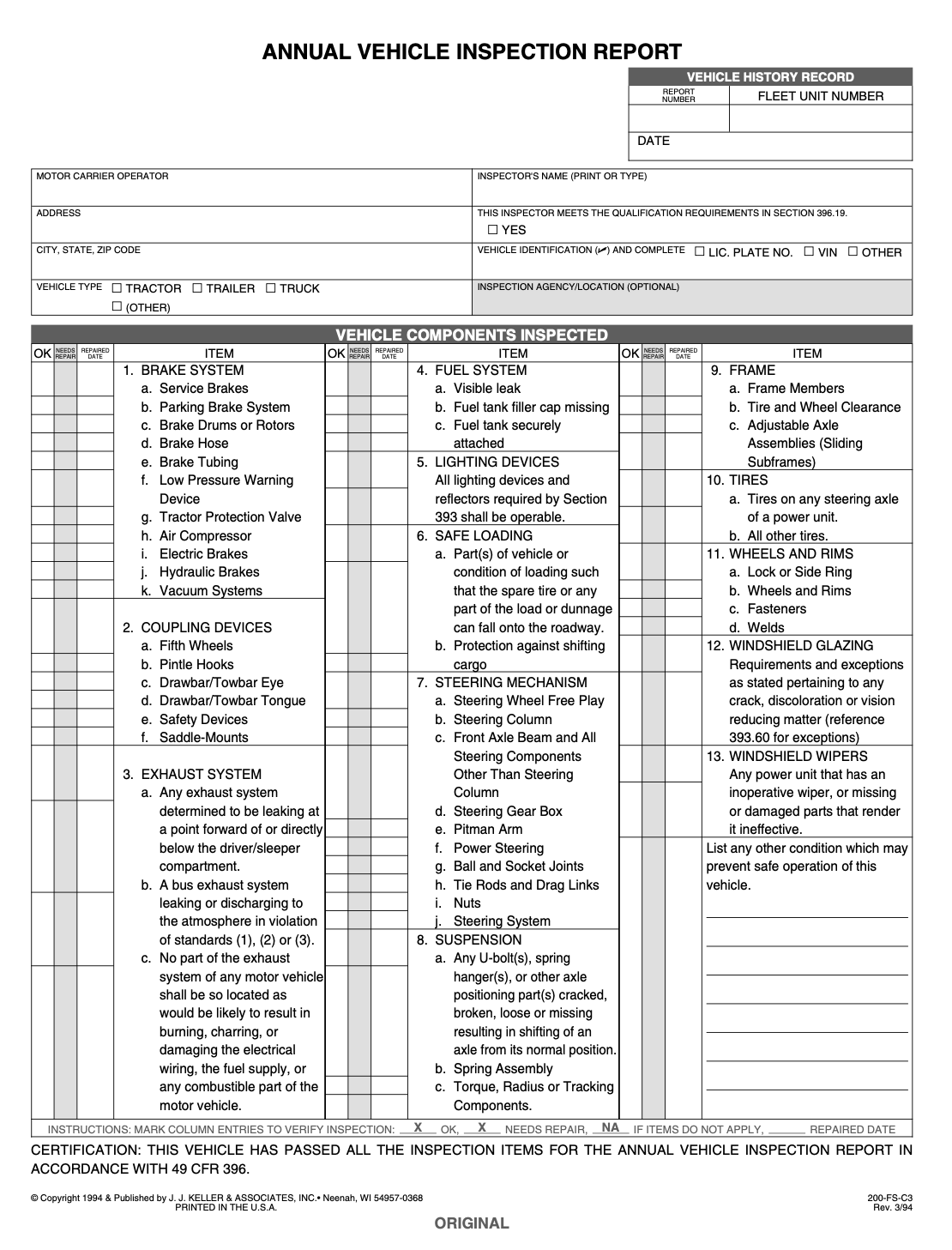
This is a template for a Vehicle inspection sheet provided by Examples.
Since inspection items of this template has various kinds regarding vehicle components, you can use periodic inspection of car. It is also the feature that you can check the chart easy-to-see.
Disadvantages of using file templates for inspection report
Below is the disadvantages of using file templates for inspection report.
The disadvantage of using an template for an inspection report is that it is cumbersome to handle the file. For example, each time you perform an inspection, you have to “open the file, enter the information, save it, and then re-share the latest file.
Therefore, if we move to a “tool that allows us to get rid of troublesome file management”, our work efficiency will be greatly improved. However, multifunctional tools are difficult to operate, so choose a tool that is simple enough that anyone can use it easily.
In conclusion, the information sharing tool Stock, which can be used intuitively even in non-IT companies, is the only choice to solve the disadvantages of file management.
With Stock, you can create a “Template” of inspection details and call it up into a “Note” for use when necessary. In addition, the inspection details entered in the note are shared in real time, so there is no need to send them as an attachment to an e-mail like with Word and Excel.
Stock| A tool that helps you to get rid of tedious file management

The simplest tool to stock information "Stock"
https://www.stock-app.info/en/
Stock is the simplest tool to stock information. Stock solves the problem, "there is no easy way to stock information within the company".
With Stock, anyone can easily store all kinds of information, including text information such as requirements, images, and files, using the Note feature.
In addition, by using the "Task" and "Message" functions, you can communicate with each topic described in the Note, so that information is not dispersed here and there and work can always be carried out in an organized manner.
<Why do we recommend Stock?>
- A tool for companies that are not familiar with ITYou don't need to have any IT expertise to get started.
- Simple and usable by anyoneStock is so simple that anyone can use it without any unnecessary features.
- Amazingly easy information storing and task managementIt is amazingly easy to store information such as shared information within a company, and intuitive task management is also possible.
<Stock's pricing>

- Free plan :Free
- Business plan :$5 / User / Month
- Enterprise plan :$10 / User / Month
*Minimum number of users: 5 users
Summary of how to create an inspection report and 4 templates
We have focused on how to create an inspection report and 4 templates for it.
By using templates, you can avoid omissions in the inspection details and save time in creating the table each time. On the other hand, the disadvantage of file is that it takes man-hours to open, input, and save the inspection table file, and then share it via e-mail.
Therefore, in order to get rid of cumbersome file management, IT tools that streamline the process from creation to sharing of inspection sheets should be used. However, multifunctional tools may be perceived as “difficult to operate” by employees in the field.
Therefore, you must choose a tool that anyone can use easily. For example, the “Stock” tool introduced here is so easy to use that even anyone from a non-IT company can start using it on the same day it is introduced.
Free registration takes only a minute, so using Stock to streamline your inspection table work and prevent problems at work.
