

Proposals are prepared in a variety of business situations, both internal and external. The completeness of a proposal has a great deal to do with whether or not the proposal will be accepted, so it is necessary to keep the points in mind while preparing the proposal.
In addition, the contents and key points to be included in a “proposal for internal problem-solving” differ from those in a proposal for external use. For this reason, many people may be troubled by the distinction between the two types of proposals.
In this issue, we will introduce the differences between internal and external proposals, how to write them, and templates for below people.
- “Confused and unable to distinguish between writing proposals for internal and external use.”
- “Creating proposals is tedious and I want to streamline the process.”
- “I do not know where I saved my documents and often have to search for them.”
If so, this article will help you easily create clear, to-the-point proposals for internal use and find the management method that best fits your company.
Contents
- 1 What is the difference between internal and external proposals?
- 2 How to write a project proposal for internal use in 4 Steps
- 3 7 recommended templates for internal project proposals
- 3.1 Proposal plan template by Polaris
- 3.2 Monthly internal project status report template by Venngage
- 3.3 Agile internal project plan template by Smartsheet
- 3.4 Project proposal template provided by Notion
- 3.5 Business project proposal template provided by Template.net
- 3.6 Project Proposal Template provided by Slite
- 3.7 Project proposal template provided by ProjectManager
- 4 Best tool for non-IT companies to streamline project proposal creation and sharing
- 5 Summary of how to write proposals and templates for internal
What is the difference between internal and external proposals?
Project proposals are written for different purposes and in different ways, depending on where they are submitted.
For example, proposals for internal use are often written to provide solutions to problems within the company, such as business improvements. On the other hand, a proposal for external use is used to propose “how the company’s products or services can approach a customer’s problem” and so on.
In addition, proposals for internal use are often created freely by the person in charge. On the other hand, a proposal for external use has a specified format and can be created simply by filling in the necessary items.
The proposal must also include data to make it persuasive. Thus, the use and writing style of a proposal differs depending on the recipient, and one must be careful not to confuse the writing style when preparing a project proposal.
How to write a project proposal for internal use in 4 Steps
This section explains how to write a proposal for internal use. By following the steps below, you can quickly create a proposal that leaves no information out.
(1) Explain the current situation and analyze issues
First, explain the current status of the business and analyze the issues and problems that are occurring.
Even if it is a proposal for internal use, the content must be objective. Therefore, explain the current status of the business in detail and add the results of your analysis of the issues, and use quantitative data for the issues analyzed.
In this way, be sure to include an explanation of the current status of the business and an analysis of the issues in order to help the client understand the need to resolve the issues.
(2) Formulate a solution
Next, describe the specific solution to the issue.
The flow of the solution can be easily visualized by first describing the overall picture of the solution and then describing the specific plan in chronological order. It is also recommended to clearly state that the solution is for the “cause” of the problem, as this makes it easier for the other party to read the text.
On the other hand, even a good proposal will not be adopted if it is deemed unrealistically difficult to implement, so consider whether the solution is realistic in terms of your company’s budget and schedule.
(3) Convey the benefits to be gained
The benefits must be accurately described, as they are the most important item in the decision to adopt a proposal.
In particular, be aware that quantitative data is also important when explaining the benefits. For example, “X% improvement in operational efficiency can be expected” or “X% reduction in operational cost per person” should be included in the proposal so that the other party can understand it at a glance.
It is also effective to use graphs and photographs to make it easy to visually understand the benefits to be gained.
(4) Clearly state the budget, resources, and timeframe
Finally, clearly state the budget, resources required, and time frame.
Consider how much money is needed to implement the proposal and describe it. In addition to the budget for the purchase of goods and materials (monetary costs), be sure to include personnel costs.
When describing the time frame, use a graph or Gantt chart to clarify the overall picture of the proposal. It is recommended to actively use such quantitative elements, as they will help you visualize the feasibility of your proposal.
7 recommended templates for internal project proposals
Here are 7 recommended templates for internal proposals. If you are worried about creating a proposal from a layout, you should not miss these templates because they will help you to create a well-structured proposal efficiently.
Proposal plan template by Polaris

This is a template for Word published by Polaris.
It has a simple design that is easy to use and helps you create a business improvement proposal, so you can create proposal without technical training.
*You need to register Polaris to use(for free).
Monthly internal project status report template by Venngage

Here is a proposal template published by Venngage.
It has a simple design and can be used for monthly report for internal. It is also recommended to edit items as your own templates in Venngage dashboard.
*You need to register Venngage to use(for free).
Agile internal project plan template by Smartsheet

Here is a proposal template published by Smartsheet.
Since you can easily store information such as “who attended the tasks” and “what about the status”, this helps members understanding about progress of project.
*You need to register Smartsheet to use(for free).
Project proposal template provided by Notion
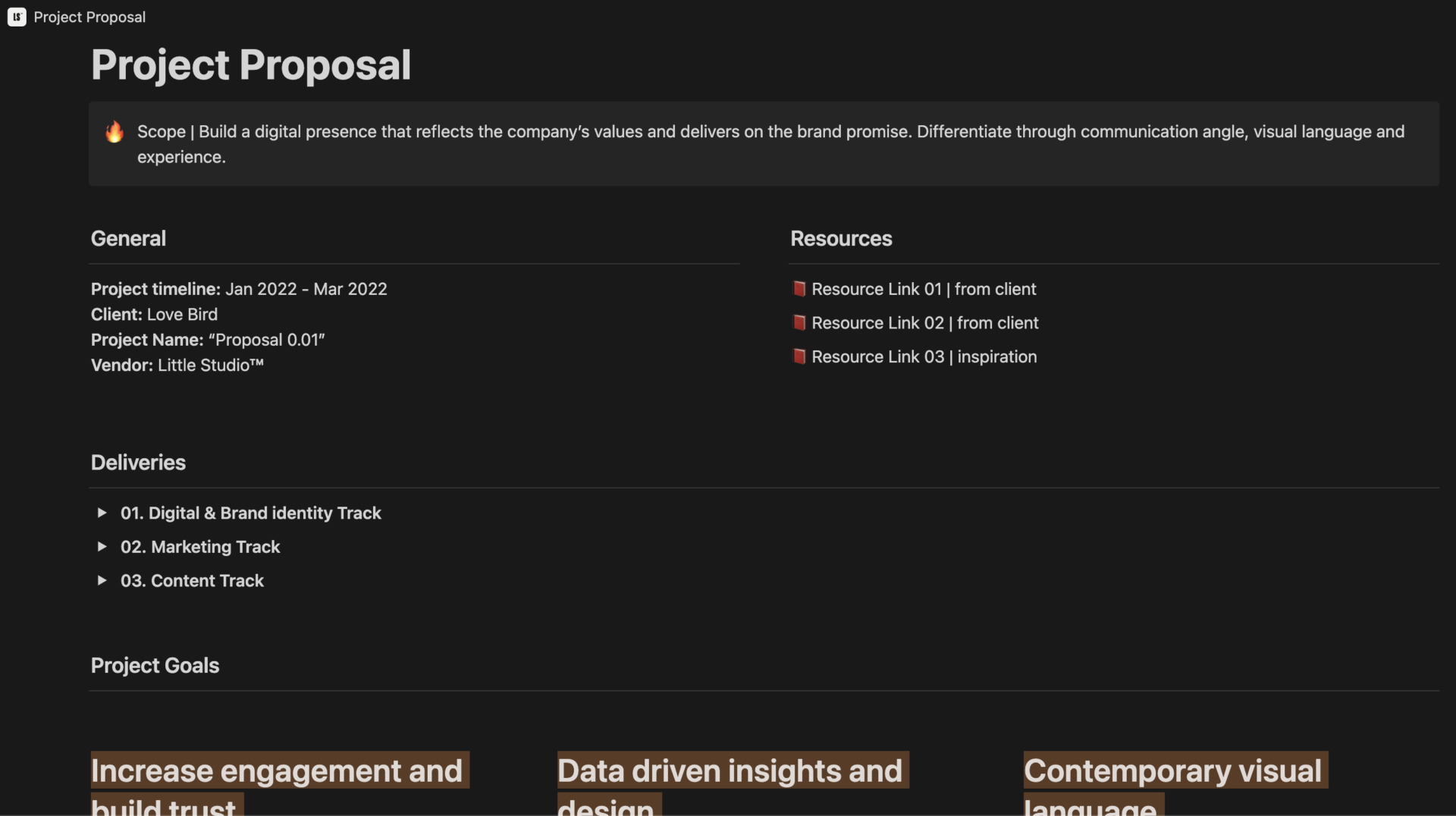
This project proposal template for internal is for Notion users.
It can be written regarding not only basic items such as project budget, tracking milestone, tasks in detail and so on, but also time line view like gantt chart.
On the other hand, you cannot use this template without Notion, so the person who have not used it should install Notion.
Business project proposal template provided by Template.net

This template has the feature which is easy-to-read provided by Template.net
As the design of top page is sophisticated, you can customize not only for using internal proposal, but also for using external proposal. It is useful for you to choose the various file extension.
*You need to sign up Template.net before using this template.
Project Proposal Template provided by Slite

This proposal template for internal is used in Slite which is for knowledge management software.
It can manage the items such as goal of project, budget, authorization. Also, as you can write down any elements on Note easily, it will help when you look back project information.
*You need to sign up Slite before using this template.
Project proposal template provided by ProjectManager

This template provided by ProjectManager helps you to compile the proposal simply.
Of course, as ProjectManager has not only internal proposal templates, but also various templates useful for business scene.
*You need to sign up ProjectManager before using this template (for free).
Best tool for non-IT companies to streamline project proposal creation and sharing
Below is the best tool that can streamline the creation and sharing of proposals for internal.
Proposals for internal use are created in order to have budgets allocated to business improvement or new projects. To speed up the decision-making process for problem solving, proposals need to be created and shared quickly.
However, even if a template can shorten the creation time, using a different tool to share the information may require more man-hours and may disperse the information. Therefore, creation and sharing should be completed in a single tool.
In particular, if the tool can be used by anyone, employees will not have a sense of resistance to use it. In conclusion, in order to streamline the creation and sharing of proposals for internal use, Stock is essential, as it allows even non-IT company employees to easily create and share proposals.
Proposals created in “Note” of Stock is immediately shared with any member of the team, and can be managed in “Folder” after creation. In addition, there is a “Message” associated with the Note, so you can communicate about the proposal without getting mixed up on the topic.
Stock|The easiest way to centralize project proposal creation and management

The simplest tool to stock information "Stock"
https://www.stock-app.info/en/
Stock is the simplest tool to stock information. Stock solves the problem, "there is no easy way to stock information within the company".
With Stock, anyone can easily store all kinds of information, including text information such as requirements, images, and files, using the Note feature.
In addition, by using the "Task" and "Message" functions, you can communicate with each topic described in the Note, so that information is not dispersed here and there and work can always be carried out in an organized manner.
<Why do we recommend Stock?>
- A tool for companies that are not familiar with ITYou don't need to have any IT expertise to get started.
- Simple and usable by anyoneStock is so simple that anyone can use it without any unnecessary features.
- Amazingly easy information storing and task managementIt is amazingly easy to store information such as shared information within a company, and intuitive task management is also possible.
<Stock's pricing>

- Free plan :Free
- Business plan :$5 / User / Month
- Enterprise plan :$10 / User / Month
*Minimum number of users: 5 users
Summary of how to write proposals and templates for internal
We have introduced the differences between internal and external proposals, how to write them, and templates to help you create proposals for internal in particular.
Since the purpose and writing style of proposals for internal and external use differ, it is necessary to distinguish between the two. In addition to describing the solution to the problem, the proposal must also quantitatively describe the benefits to the company and how the project will proceed.
Thus, an internal proposal needs to be written while keeping various points in mind, which can be made more efficient by using a template. However, proposals created using Word templates need to be shared with other tools, which can lead to information dispersion.
Therefore, there is a need for an information sharing tool like Stock that can be used intuitively create and share proposals regardless of IT literacy.
It only takes 1 minute to register for free, so using Stock to centralize information within your company and streamline the process from proposal creation to operation.
