

Regardless of industry or occupation, “task management” is necessary to prevent omissions in work. In addition, with the recent digitization of business operations, an increasing number of companies are using smartphone apps for task management.
On the other hand, since there are a wide variety of smartphone task management apps, many people may not know which one is best suited for their company.
In this issue, we will focus on recommended app for task management on smartphones and their selection points for below people.
- “I want to manage tasks efficiently with an app on the smartphone.”
- “I do not know the selection points for task management app.”
- “I am looking for an app that allows me to easily manage tasks on my smartphone.”
This article will help you find the best app selection criteria for smartphone use, as well as find a task management app that matches your company’s needs.
Contents
What are types of tasks?
Tasks can be divided into 2 categories: “smartphone tasks” and “tasks at work”. Therefore, we will explain the meaning of each in detail below.
What is a smartphone task?
A smartphone task refers to an app that is running on your smartphone. The following 3 terms are related to smartphone tasks.
- Multitasking
- Task Switching
- Task Kill
Lists apps, and you can switch tasks and kill tasks.
Easily switch between running apps. There is no need to search for an app from the list of apps.
Quit running apps. Deleting tasks on a regular basis will reduce battery consumption.
The figure below shows how to display tasks (multitasking) on the iPhone, which is widely introduced as a company smartphone. Since the method of operation differs depending on the model, use this as a reference when tasks are not displayed.
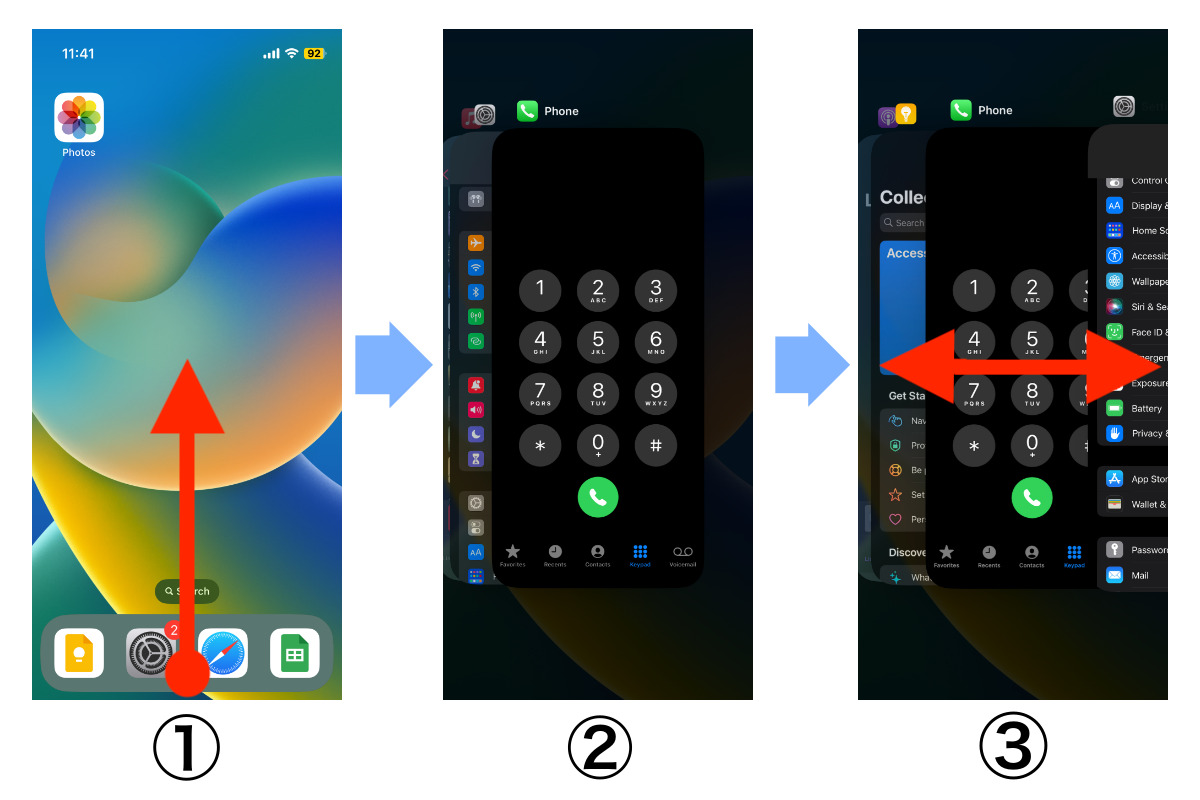
On the other hand, Android has a “2 buttons navigation” at the bottom of the screen, and tap it and swipe up. Since nothing a task button in some models, you will need to check the user manual for details.

As shown in the figure above, although it is differ from according to which iPhone or Android you use, the flow of the steps of task selecting is mostly same.
What is a task at work?
A “task” as used in work refers to a small pieces of work that is broken down into.
If tasks are handled one by one, not only will work proceed smoothly, but also deadlines will be met. On the other hand, tasks must be assigned according to the workload of each employee, and progress must be monitored.
In this way, reliable task management is required for team work in order to avoid problems such as missed deadlines. In particular, these days, due to the influence of digitalization, an increasing number of companies are using smartphone apps to manage tasks.
3 merits of managing tasks with a smartphone
If you properly understand the merits of managing tasks on your smartphone, you will have a clearer image of “how it should be deployed within internal”. We introduce 3 merits of task management with smartphones as below.
(1) Can be used regardless of time and location
Unlike PCs, you can use your smartphone even on out easily.
PCs cannot be used in environments without Internet access, which is inconvenient when you want to check tasks outside the office. On the other hand, a smartphone can be used regardless of time and location.
With a smartphone, you can manage tasks anywhere. Therefore, there is no need to worry about stopping work even when you are on the move or on a business trip.
(2) Tasks can be managed with flick input
Smartphones can be used to input text with a flick of the finger.
Since smartphones are used more routinely than PCs, many people find flick input easier to use than keyboard input. In addition, since smartphones are designed for easy operation, they have the advantage of being more intuitive to use than PCs.
If you are accustomed to flick input on your smartphone, a smartphone app for task management can greatly reduce the burden of input.
(3) It will be easier to concentrate on your work
Finally, there is the merit of being able to concentrate on your work more easily.
By using a smartphone, you can easily manage tasks at hand without switching PC screens. Therefore, the “hassle of stopping PC work to enter and modify tasks” is reduced, and you can concentrate on your work.
In this way, if you manage tasks with your smartphone, you will be able to work much more easily.
The best apps for task management on your smartphone for free
Below is the best app for managing tasks on your smartphone.
Task management app for smartphones must have excellent security, as they are used outside the office in some situations. For example, they can prevent leaks by using an encryption method that is also used for credit card payments, or protect information from unauthorized access by using 2-step authentication.
In addition, to ensure that everyone on the team can use the app without burden, it must also be determined if it can be operated intuitively regardless of the device. Such an app will save you the trouble of teaching how to use it from scratch.
In conclusion, your company should select Stock, which is so simple that even employee of a non-IT company can use it immediately.
“Note” of Stock allows users to leave all kinds of information easily, and “Task” linked to the Note prevent work from being omitted. In addition, “Message” can be linked to the Note, so you can smoothly communicate about tasks regardless of whether you are using a PC or a smartphone.
Stock| Easiest task management app efficiently even from your smartphone

The simplest tool to stock information "Stock"
https://www.stock-app.info/en/
Stock is the simplest tool to stock information. Stock solves the problem, "there is no easy way to stock information within the company".
With Stock, anyone can easily store all kinds of information, including text information such as requirements, images, and files, using the Note feature.
In addition, by using the "Task" and "Message" functions, you can communicate with each topic described in the Note, so that information is not dispersed here and there and work can always be carried out in an organized manner.
<Why do we recommend Stock?>
- A tool for companies that are not familiar with ITYou don't need to have any IT expertise to get started.
- Simple and usable by anyoneStock is so simple that anyone can use it without any unnecessary features.
- Amazingly easy information storing and task managementIt is amazingly easy to store information such as shared information within a company, and intuitive task management is also possible.
<Stock's pricing>

- Free plan :Free
- Business plan :$5 / User / Month
- Enterprise plan :$10 / User / Month
*Minimum number of users: 5 users
3 selection points for task management apps
Task management apps are diverse, and selecting the right one can be time-consuming. We will explain the selection points for you to narrow down the task management apps that are right below.
(1) Is it multi-device compatible?
First, check to see if the app is multi-device compatible.
Multi-device support refers to “specifications that allow the same information to be viewed and edited on different devices”. In other words, information can be accessed regardless of time and location.
In this way, multi-device compatible apps can be used to “check the contents edited on your smartphone on your PC at work while commuting”.
However, if there is a difference in functions and feel between devices, employees may find it difficult to use the app, so you should also make sure that it is easy to use regardless of the device.
(2) Can tasks and information be linked?
Next, check if it is possible to link tasks and information together.
When processing tasks, “related information” such as task details, documents, and various data is essential. If the information is stored in a file format on an internal server or in a storage app, it is not possible to link the task to the information, and it takes time and effort to search information and to open the file each time.
On the other hand, using Stock, which links tasks and information, not only saves time in searching for documents, but also reduces costs that using multiple tools.
(3) Can anyone use it easily?
Finally, make sure that anyone can use the app easily.
Especially in the case of non-IT companies, if the task management app is not easy for anyone to use, the speed of work will decrease. Finally, employees will stop using the app and “continue to pay unnecessary monthly fees”.
In order to avoid such a case, you should choose a task management app that does not have excess or insufficient of the necessary functions.
Summary of overview about smartphone tasks and recommended app
We have focused on an overview of smartphone tasks and recommended app so far.
Since smartphone tasks have a different meaning from “tasks at work”, you need to use them differently in business situations. In addition, nowadays, more and more companies are using smartphone apps to manage work tasks efficiently.
Using a smartphone task management apps has the advantage of allowing you to check tasks at any time and place, and of making it easier to find information. However, in order to benefit from the advantages, be sure to check whether the app is “multi-device compatible” and “whether tasks and information can be linked together”.
Furthermore, if the app is complicated to use, members who are not familiar with IT may not be able to use it properly. A simple app like Stock that does not excess or insufficient functions and can be used immediately even by non-IT employees are required.
Free registration only takes 1 minute, so using Stock on your smartphone and streamline your team’s task management.
