

The creation of an employee directory is needed for managing the member’s personal information regardless of the size of the company or the type of work, an employee directory must be maintained when new workers are hired.
However, many people may be concerned that it is difficult to create an employee directory from scratch every time a part-time worker or new employee joins the company.
In this issue, we will focus on 5 free directory templates for free and how to write an employee directory that you can use for below people.
- “I do not know what to include in an employee directory.”
- “I want to create an employee directory easily using a template.”
- “I am looking for the best tool to manage my employee directory.”
If you are looking for the best template to manage your employee directory, this article will help you understand more about employee directories and how to create them efficiently.
Contents
- 1 What is an employee directory?
- 2 5 items that must be included in the employee directory
- 3 5 templates for employee directory for free
- 4 What are the 3 disadvantages of using Excel to manage employee directories?
- 5 Information management tool for creating and sharing employee directories
- 6 Summary of 5 employee directories template and tips for them
What is an employee directory?
An employee directory is a document that contains personal information about workers, such as names and dates of birth, picture of each employee basically.
Especially, Excel or Google Sheets are often used by the team that are difficult to install cloud tools for increasing productivity such as SFA.
On the other hand, increasing the member causes what management cost by Excel and Google Sheets will be increase, so you should review the operation whether continuing file management of them and or not.
5 items that must be included in the employee directory
The following 5 items are required to be included in the employee directory.
- Name, date of birth, and gender
- Address
- History
- Type of work
- Date of beginning employment
Basic information about the worker. Note that the name on the family register must be included in the employee register.
If the address listed on the certificate of residence differs from the actual address, the actual address should be listed so that contact can be made.
In principle, include internal history such as transfers and reassignments, and if necessary, include information such as external history and last education.
Describe the type of work performed by the worker within the company.
Enter the date when the worker began employment. Note that this is not the date when the worker was hired.
When preparing an employee list, make sure that the above items are included.
5 templates for employee directory for free
Below are 5 recommended templates for employee directories. These templates are free of charge and are a must-see if you are looking to improve the efficiency of your employee directory.
(1) Employee directory template by Onedirectory
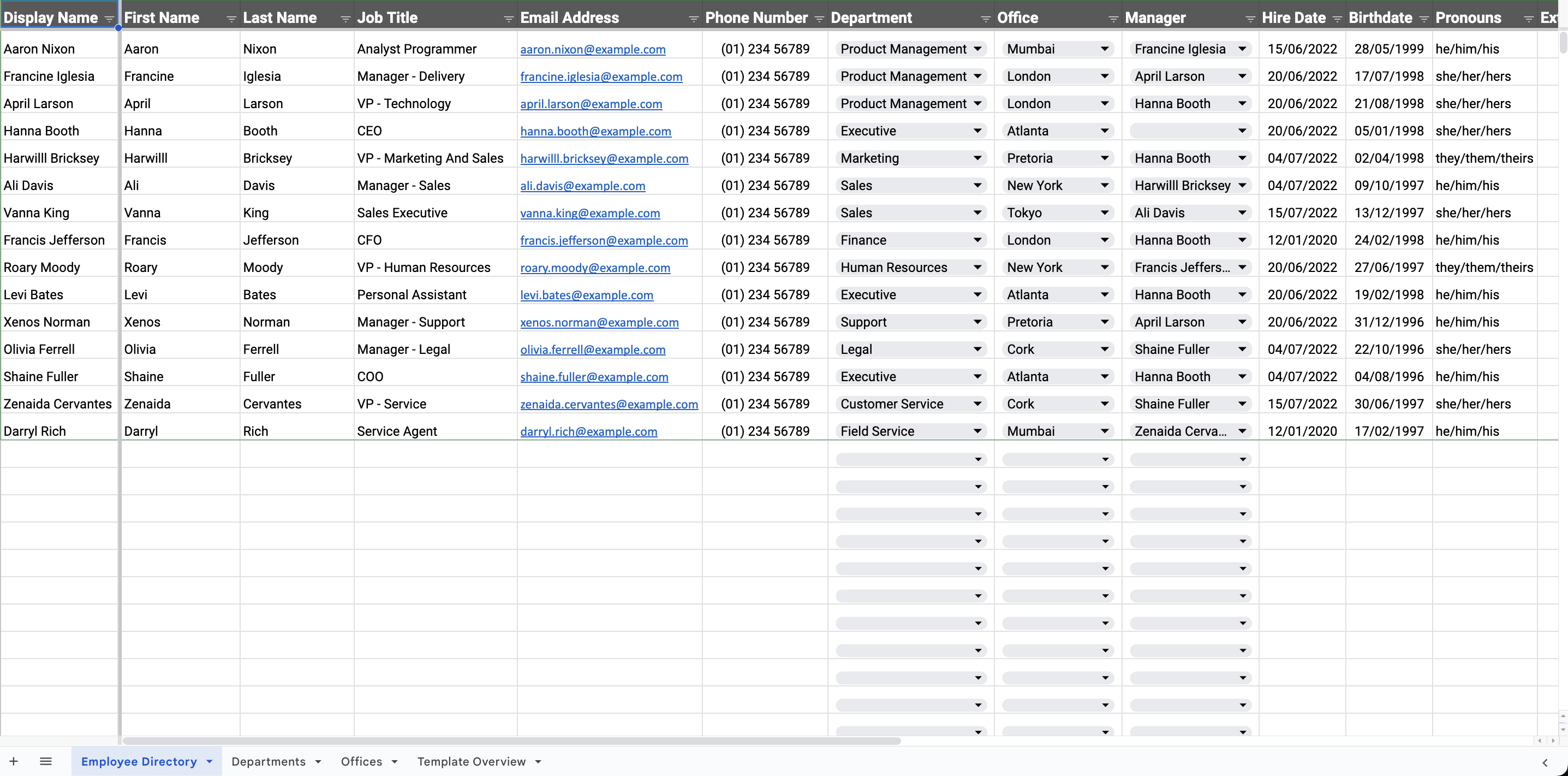
This is a simple employee directory template provided by Onedirectory.
Onedirectory is employee directory software for managing information of each employee. The article issued by Onedirectory gives us the template and process of how to create it, you can use it immediately.
(2) Smartsheet employee list template for evaluation
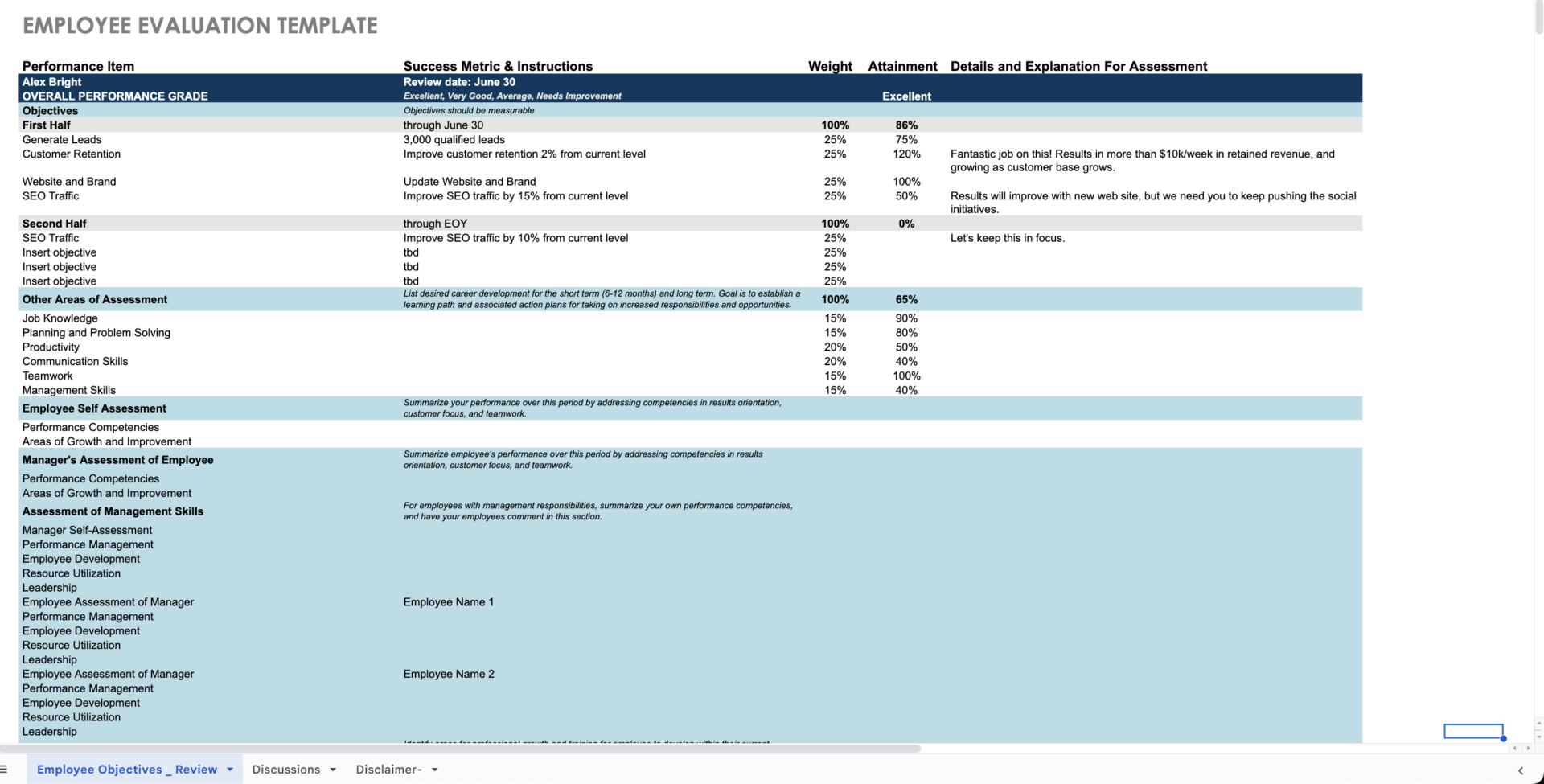
Here is a free employee directory template for evaluation provided by Smartsheet.
As you can compile the information of team member such as output, performance competencies one by one in this template, you will be able to evaluate them correctly.
(3) Employee contact list template by LeaveBoard
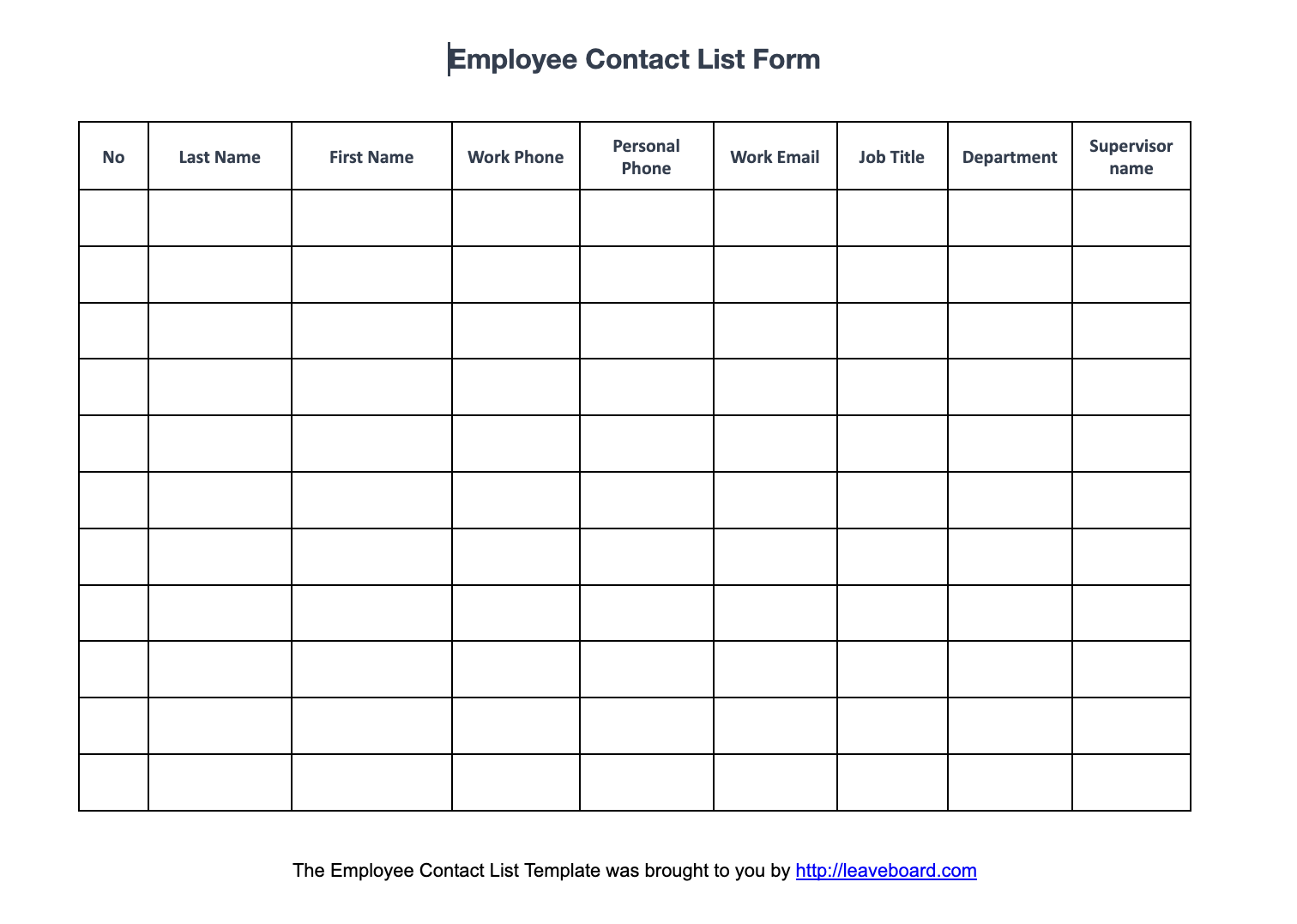
This is a Word template for employee contact list provided by Leaveboard, although using table like Excel.
Since you can manage basic items like name, phone number and so on, it is for small team or the person who wants to manage information minimum.
(4) Template for employee directory by Airtable

This is a rich template for employee directory provided by Airtable.
Airtable is a cloud tool which can optimize the database. Its template can manage not only various information of employee in detail, but also each task of any member by Kanban view or Calendar view.
(5) People directory template by Notion
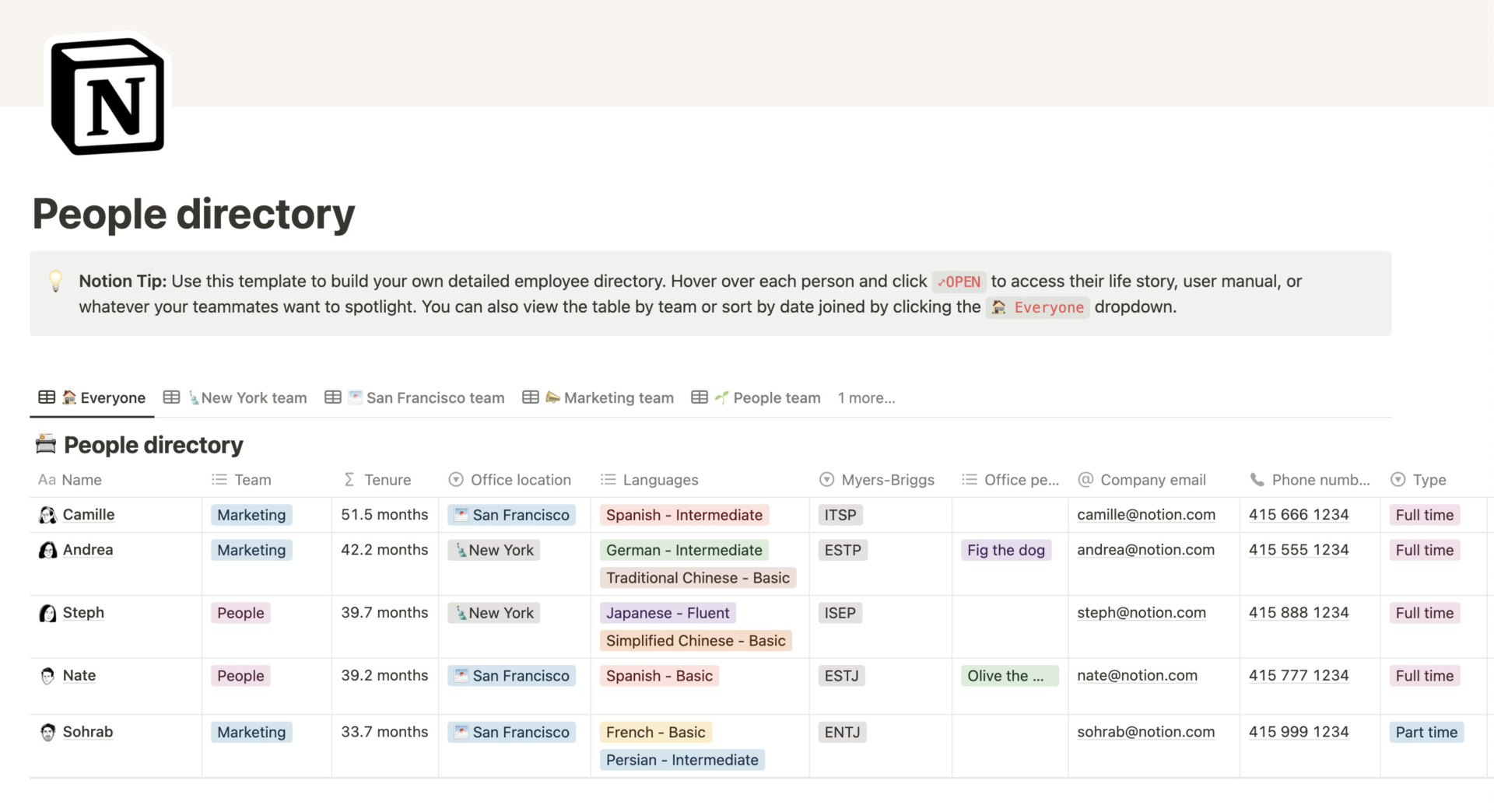
The template is for Notion user to manage information as people directory.
Since you can manage the personal information of each member and separate the section by tabs, no need to worry about operation stopped. (You need to register and create Notion account.)
What are the 3 disadvantages of using Excel to manage employee directories?
This section describes the disadvantages of creating and managing employee directories in Excel or Google Sheets, and should be noted if you are considering creating or managing employee directories in Excel and Google Sheets.
(1) Poor operability
Avoid using Excel and Google Sheets to create and manage employee rosters because Excel is not easy to use and accuracy may be compromised.
Excel files cannot be edited by more than one person unless they are shared. Even if edited by multiple users, simultaneous updates may corrupt the data or cause the latest file to be buried by other old files.
For these reasons, Excel and Google Sheets is not suitable for creating employee directories, which require accuracy.
(2) Security concerns
Security concerns are another disadvantage of Excel.
Since Excel is originally intended for calculation, it is not perfect in terms of security, which is important in information management, and information management with Excel and Google Sheets involves risks such as information leaks due to erroneous file transmissions and unauthorized access from the outside.
Therefore, in order to prevent personal information leakage, it is advisable not to use Excel to manage employee lists.
(3) Unable to set permissions
Excel and Google Sheets has the disadvantage of not being able to set detailed permissions, which means that the range of viewers and editors is large.
Since an employee list contains personal information, it is desirable to limit to some extent who can edit and view it. However, since Excel does not allow for editing or access restrictions to be placed on each user, there is a risk that anyone can view personal information.
Therefore, it is dangerous to manage employee directories in Excel, which does not have the ability to place restrictions on members. Therefore, in order to properly manage your employee directory, you should implement IT tools such as Stock that allow you to restrict who can edit and manage your employee list.
Information management tool for creating and sharing employee directories
Below is the best information management tool for creating and sharing employee directories.
Templates are an efficient way to create employee directories. However, searching for a template each time you create an employee list can be tedious and time-consuming.
In addition, managing templates in Excel and Google Sheets is not convenient because it is not possible to create employee directry at the same time for security reasons. Therefore, it is recommended to introduce a tool that is equipped with a template function and can recall the contents of a standardized description at the touch of a button, as well as manage that information.
In conclusion, the tool that should be introduced for your company is Stock, which allows you to register templates and create and share employee directories most easily.
Stock’s “Note” has a template feature that makes it easy to create an employee directory. In addition, not only can you set permissions to view and edit notes, but Stock is ISO27001 certified, so you do not have to worry about security.
Stock| The easiest way to stock your team’s information

The simplest tool to stock information "Stock"
https://www.stock-app.info/en/
Stock is the simplest tool to stock information. Stock solves the problem, "there is no easy way to stock information within the company".
With Stock, anyone can easily store all kinds of information, including text information such as requirements, images, and files, using the Note feature.
In addition, by using the "Task" and "Message" functions, you can communicate with each topic described in the Note, so that information is not dispersed here and there and work can always be carried out in an organized manner.
<Why do we recommend Stock?>
- A tool for companies that are not familiar with ITYou don't need to have any IT expertise to get started.
- Simple and usable by anyoneStock is so simple that anyone can use it without any unnecessary features.
- Amazingly easy information storing and task managementIt is amazingly easy to store information such as shared information within a company, and intuitive task management is also possible.
<Stock's pricing>

- Free plan :Free
- Business plan :$5 / User / Month
- Enterprise plan :$10 / User / Month
*Minimum number of users: 5 users
Summary of 5 employee directories template and tips for them
We have focused on how to write an employee directory, templates, and the disadvantages of managing it in Excel.
The use of a template is an efficient way to create an employee list. However, it is time-consuming to search for a template each time a list of employees is created, and employee lists, which are personal information, must be managed appropriately.
However, managing by Excel and Google Sheets file is not recommended from the viewpoint of operability and security. Therefore, it is recommended to implement a tool that is equipped with a template function and can restrict editing and access.
In conclusion, the best tool for creating and managing employee directories is the information sharing tool “Stock”, which can be used by non-IT companies without orientation.
Free registration takes only a minute, so using Stock to manage your employee directory easily and securely while reducing wasted work time.
